
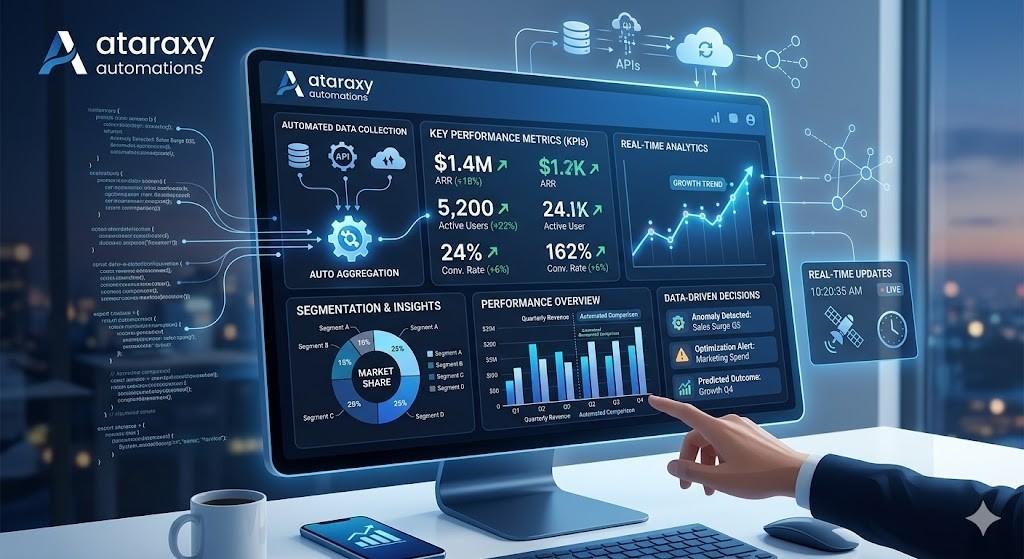
Data + Analytics Automation for Business Growth
In today’s competitive business environment, staying ahead means using data to drive decisions. However, managing and analyzing vast amounts of data manually can be a major drain on time and resources. That’s where data and analytics automation comes into play.
Automating data collection, analysis, and reporting empowers businesses to make faster, more informed decisions while freeing up time for teams to focus on growth. With automated systems, businesses can gain insights from their data in real time, driving more effective strategies and accelerating business growth.
In this guide, we’ll walk you through how to leverage data + analytics automation for business growth, the tools you need, and the benefits of implementing these systems in your operations. If you need help setting up your data and analytics automation system, call us at +1 (662) 400‑6587, email us at AtaraxyAutomations@gmail.com, or visit our main shop page.
Why Data + Analytics Automation Matters for Business Growth
Data is one of the most valuable assets a business can have — but only if you can interpret and act on it quickly. Automating data collection and analytics allows businesses to access real-time insights that inform decisions and fuel growth strategies.
Here’s why data + analytics automation is essential for business growth:
⏱️ Save Time on Manual Tasks
Automated systems collect and process data quickly, eliminating time spent manually pulling data, generating reports, and analyzing metrics. This allows you to focus on actionable insights and strategic decisions instead.
📊 Access Real-Time Insights
With automation, you no longer have to wait for periodic reports. Data is collected and analyzed in real time, allowing businesses to make timely adjustments and seize opportunities immediately.
💡 Improve Decision-Making
Automating data analysis means you’re always working with accurate, up-to-date information. This leads to better decision-making, as you can rely on data-driven insights rather than gut feelings or outdated figures.
🚀 Scale Operations Efficiently
As your business grows, manually analyzing data becomes more difficult and time-consuming. With automated systems, your data analysis can scale seamlessly, providing insights across departments and business units without increasing workload.
By automating your data collection and analytics, you can gain deeper insights, improve operational efficiency, and create a more effective strategy for business growth.
Step 1: Identify Key Metrics and KPIs
Before you start automating your data analysis, it’s crucial to define the metrics and key performance indicators (KPIs) that will drive your business growth. These metrics should align with your business goals, helping you measure success and identify areas for improvement.
Common Metrics for Business Growth:
- Revenue Growth: Total revenue, average order value (AOV), revenue per customer (RPC)
- Marketing Metrics: Website traffic, conversion rate, cost per lead (CPL), return on investment (ROI)
- Customer Metrics: Customer lifetime value (CLTV), churn rate, Net Promoter Score (NPS)
- Operational Metrics: Inventory turnover, employee productivity, project completion rates
- Sales Metrics: Sales pipeline health, lead-to-conversion rates, sales growth, deal velocity
Pro Tip:
Work with your team or stakeholders to align on the most relevant KPIs for your specific business objectives. Once you know what to track, automating the reporting process becomes much easier.
Step 2: Choose the Right Data Automation Tools
To automate data collection, analysis, and reporting, you need the right tools. The best tools for data + analytics automation will integrate with your existing data sources, such as CRM systems, marketing platforms, and financial software, and help you generate insights in real time.
Best Tools for Data + Analytics Automation:
- Google Analytics: Provides detailed website performance data and automates website traffic analysis, conversion tracking, and marketing campaign performance.
- Power BI: A powerful business intelligence tool for data visualization and advanced analytics. Automate reports and dashboards from various data sources.
- Tableau: Known for its advanced data visualization capabilities, Tableau allows businesses to analyze and visualize large datasets automatically.
- Databox: Connects to over 60 data sources, including Google Analytics, HubSpot, and social media platforms, to automate KPI reporting and dashboards.
- Zapier / Make (Automation Platforms): Automate workflows between your data sources, creating custom triggers and actions that pull and analyze data automatically.
Why it works:
These tools allow businesses to seamlessly integrate their data sources, automate data analysis, and present that data in easily understandable formats, all in real-time.
Step 3: Set Up Automated Data Collection
Once you’ve selected the tools that work for your business, the next step is to automate data collection. Many automation tools offer integrations with common data sources like Google Analytics, CRM systems, and marketing platforms, allowing you to gather data automatically without manual input.
How to Automate Data Collection:
- Google Analytics: Set up automated data collection for website traffic, conversion tracking, and user behavior.
- CRM Tools (HubSpot, Salesforce): Automatically track customer interactions, sales performance, and conversion rates.
- Marketing Platforms (Facebook Ads, Google Ads): Integrate your ad platforms to track ad spend, clicks, and ROI automatically.
- Email Marketing (MailChimp, ActiveCampaign): Track email performance, open rates, click-through rates (CTR), and conversions automatically.
Why it works:
Automating the data collection process ensures that your performance metrics are always up-to-date, reducing human error and manual work.
Step 4: Automate Data Analysis and Reporting
Once your data is being collected automatically, the next step is to automate the analysis and reporting process. The right tools will not only collect data but also provide in-depth analysis, insights, and visualizations that allow you to monitor performance in real-time.
How to Automate Data Analysis:
- Google Data Studio: Use built-in connectors to Google Analytics and other platforms to automatically generate real-time dashboards and reports.
- Power BI/Tableau: Create data models that automatically update as new data is collected, generating insights without manual intervention.
- Databox: Create custom dashboards that track performance across multiple platforms, automatically pulling and analyzing data.
- Zapier / Make: Set up workflows to trigger automatic actions based on your data, such as sending reports when certain thresholds are met.
Why it works:
Automating the analysis ensures that your team or clients receive real-time insights, helping you make timely decisions without having to manually sift through data.
Step 5: Visualize Data with Dashboards
To make your automated data actionable, you need to visualize the data in an easy-to-understand format. Dashboards help you present complex data in a way that’s visually appealing and easy to interpret.
Best Tools for Data Visualization:
- Google Data Studio: Build interactive dashboards with data visualizations like pie charts, line graphs, bar charts, and more.
- Power BI: Use drag-and-drop features to create custom visualizations based on your KPIs.
- Tableau: Create highly customizable and interactive data visualizations with advanced filters and drill-down capabilities.
- Databox: Build real-time dashboards that display key performance metrics across all platforms.
Why it works:
Visualizations make it easier for decision-makers to quickly interpret the data and identify trends, issues, or opportunities at a glance.
Step 6: Automate Report Delivery and Client Access
Now that your reports are automated, the final step is to automate report delivery. You can schedule your reports to be sent automatically via email, or you can give clients access to a live dashboard where they can track performance in real time.
How to Automate Report Delivery:
- Google Data Studio: Set up automatic email delivery of reports or provide clients with access to live dashboards.
- Power BI: Schedule automated email delivery of customized reports to stakeholders.
- Databox: Automate daily, weekly, or monthly reports via email or allow clients to log in to their dashboards for real-time updates.
- Zapier: Set up workflows to automatically send performance reports to clients via email or Slack.
Why it works:
Automating the delivery of reports ensures clients receive timely updates without needing to manually generate or send reports. It also gives clients the flexibility to access their dashboards at any time.
Why Data + Analytics Automation Drives Business Growth
Here’s why data + analytics automation is crucial for business growth:
1. Improved Efficiency
Automating data collection, analysis, and reporting saves time and resources that can be invested in growing the business.
2. Real-Time Insights
Data automation gives you access to the latest performance data, allowing you to make informed decisions quickly and strategically.
3. Scalability
Automated systems scale effortlessly as your business grows, allowing you to handle more data, more clients, and more reports without adding additional resources.
4. Better Decision-Making
With real-time, accurate data at your fingertips, you can make data-driven decisions that accelerate business growth and success.
Signs Your Business Needs Data + Analytics Automation
You may need data + analytics automation if:
- You’re spending too much time collecting and reporting data manually
- You want real-time access to data and performance insights
- You need to scale your data reporting and analysis without adding more staff
- You want to improve decision-making with actionable insights
- Your current data systems are fragmented and inefficient
If any of these pain points resonate, it’s time to implement data + analytics automation.
Why Choose Ataraxy Automations
At Ataraxy Automations, we specialize in helping businesses automate their data and analytics systems to drive growth, efficiency, and better decision-making. We provide custom solutions for automating data collection, analysis, reporting, and dashboard creation, making it easier to scale your operations.
We help businesses:
- Automate data collection and performance tracking
- Build custom dashboards and visualizations
- Deliver real-time, automated reports to clients or internal teams
- Make data-driven decisions that accelerate growth
To get started with data + analytics automation for your business, call us at +1 (662) 400‑6587, email AtaraxyAutomations@gmail.com, or visit our Ataraxy Automations shop.
Final Thoughts
Data + analytics automation is essential for businesses that want to make smarter, faster decisions while saving time and resources. By automating data collection, analysis, reporting, and visualization, you can ensure that your team and clients always have access to the latest, most accurate insights — without the manual effort.
Start automating your data and analytics processes today and unlock the power of real-time insights to drive business growth. Visit our shop page, call +1 (662) 400‑6587, or email AtaraxyAutomations@gmail.com to get started.